について
PDF Reader is a reading app that helps you manage and open ebooks on your phone.
説明
PDF Reader is one of the best reading tools. It can help you to easily manage, and open all the ebooks on your phone.
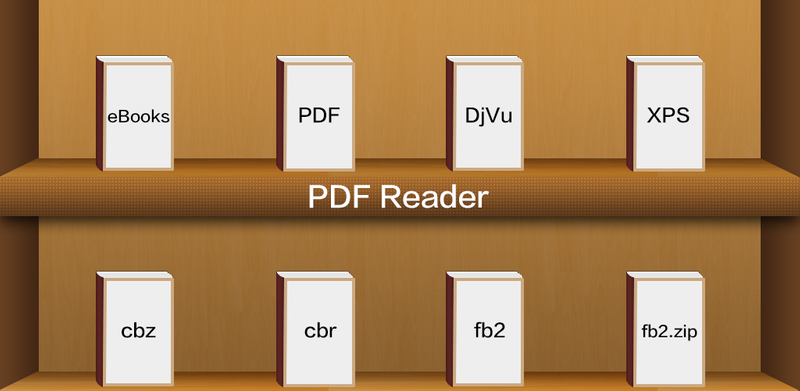
Supports ebook formats: PDF, DjVU, XPS (OpenXPS), FictionBook (fb2 and fb2.zip), Comics Book formats (cbr and cbz), plus - starting with version 2.0 - EPUB and RTF.
Key features:
* Pages or scroll view. Page flipping animation.
* Table of contents, bookmarks, text search.
* Bookmarks on text fragments (comments or corrections) - useful for proof reading.
* Export of bookmarks to text file.
* Built-in file browser, quick recent books access.
* Online catalogs (OPDS) support.
* LitRes online book store support.
* Text to Speech (TTS) support.
* Hyphenation dictionaries;
* Most complete FB2 format support: styles, tables, footnotes.
* Additional fonts support (place .ttf to /sdcard/fonts/)
* Support for Chinese, Japanese, Korean languages; autodetection of TXT file encoding (GBK, Shift_JIS, BIG5, EUC_KR).
* Day and night profiles (two sets of colors, background, backlight levels).
* Brightness adjustments by flick on left edge of screen.
* Background texture (stretched or tiled) or solid color.
* Paperbook-like page turning animation or "sliding page" animation.
* Dictionary support (ColorDict, GoldenDict, Fora Dictionary, Aard Dictionary).
* Customizable tap zone and key actions.
* Autoscroll (automatic page flipping) - start using menu/goto/autoscroll or assign action Autoscroll on key or tap zone; Change speed using volume keys or bottom-right and bottom-left tap zones; stop - tap any other tap zone or key.
* Can read books from zip archives.
* Automatic reformatting of .txt files (autodetect headings etc.)
* Styles can be customised in wide range using external CSS.
* Select text using double tap (optional).
Disclaimer:
This app is base on EbookDroid code, and licensed under the GNU General Public License.
EbookDroid code: http://code.google.com/p/ebookdroid/
GNU General Public License: http://www.gnu.org/licenses/
Supports ebook formats: PDF, DjVU, XPS (OpenXPS), FictionBook (fb2 and fb2.zip), Comics Book formats (cbr and cbz), plus - starting with version 2.0 - EPUB and RTF.
Key features:
* Pages or scroll view. Page flipping animation.
* Table of contents, bookmarks, text search.
* Bookmarks on text fragments (comments or corrections) - useful for proof reading.
* Export of bookmarks to text file.
* Built-in file browser, quick recent books access.
* Online catalogs (OPDS) support.
* LitRes online book store support.
* Text to Speech (TTS) support.
* Hyphenation dictionaries;
* Most complete FB2 format support: styles, tables, footnotes.
* Additional fonts support (place .ttf to /sdcard/fonts/)
* Support for Chinese, Japanese, Korean languages; autodetection of TXT file encoding (GBK, Shift_JIS, BIG5, EUC_KR).
* Day and night profiles (two sets of colors, background, backlight levels).
* Brightness adjustments by flick on left edge of screen.
* Background texture (stretched or tiled) or solid color.
* Paperbook-like page turning animation or "sliding page" animation.
* Dictionary support (ColorDict, GoldenDict, Fora Dictionary, Aard Dictionary).
* Customizable tap zone and key actions.
* Autoscroll (automatic page flipping) - start using menu/goto/autoscroll or assign action Autoscroll on key or tap zone; Change speed using volume keys or bottom-right and bottom-left tap zones; stop - tap any other tap zone or key.
* Can read books from zip archives.
* Automatic reformatting of .txt files (autodetect headings etc.)
* Styles can be customised in wide range using external CSS.
* Select text using double tap (optional).
Disclaimer:
This app is base on EbookDroid code, and licensed under the GNU General Public License.
EbookDroid code: http://code.google.com/p/ebookdroid/
GNU General Public License: http://www.gnu.org/licenses/
新着情報
Supports a memory page size of 16 KB
スクリーンショット


詳細
更新されました
2026年6月22日
開発者
pickwick santaGoogle Playで見る
Googleプレイ権限
Permissions
- android.permission.PACKAGE_USAGE_STATS
- android.permission.WRITE_EXTERNAL_STORAGE
- android.permission.READ_EXTERNAL_STORAGE
- android.permission.INTERNET
- android.permission.ACCESS_NETWORK_STATE
- android.permission.ACCESS_WIFI_STATE
- android.permission.MANAGE_EXTERNAL_STORAGE
- com.google.android.finsky.permission.BIND_GET_INSTALL_REFERRER_SERVICE
- com.google.android.gms.permission.AD_ID
- android.permission.ACCESS_ADSERVICES_AD_ID
- android.permission.ACCESS_ADSERVICES_ATTRIBUTION
- android.permission.ACCESS_ADSERVICES_TOPICS
- android.permission.WAKE_LOCK
- android.permission.FOREGROUND_SERVICE
- pdf.reader.DYNAMIC_RECEIVER_NOT_EXPORTED_PERMISSION
報告
古いバージョン
PDF Reader 7.1.5
ダウンロード
XAPK
9.6 MB
PDF Reader 7.1.3
ダウンロード
XAPK
6.3 MB
PDF Reader 7.1.2
ダウンロード
XAPK
6.3 MB
PDF Reader 7.1.1
ダウンロード
XAPK
6.3 MB
PDF Reader 7.1.0
ダウンロード
XAPK
6.6 MB
PDF Reader 7.0.9
ダウンロード
XAPK
6.1 MB
PDF Reader 7.0.5
ダウンロード
XAPK
6.2 MB
PDF Reader 7.0.2
ダウンロード
APK
20.1 MB
PDF Reader 7.0.1
ダウンロード
APK
20.1 MB
PDF Reader 7.0.0
ダウンロード
APK
22.4 MB
PDF Reader 6.5
ダウンロード
XAPK
7.4 MB
PDF Reader 6.4
ダウンロード
APK
6.7 MB
PDF Reader 6.3
ダウンロード
APK
6.8 MB
PDF Reader 6.2
ダウンロード
APK
6.6 MB
PDF Reader 6.1
ダウンロード
APK
6.6 MB
PDF Reader 5.9
ダウンロード
APK
6.5 MB
PDF Reader 5.8
ダウンロード
APK
6.5 MB
PDF Reader 5.7
ダウンロード
APK
6.5 MB
PDF Reader 5.6
ダウンロード
APK
6.6 MB
PDF Reader 5.5
ダウンロード
APK
6.6 MB
PDF Reader 5.4
ダウンロード
APK
6.6 MB
PDF Reader 5.3
ダウンロード
APK
6.8 MB
PDF Reader 5.2
ダウンロード
APK
6.8 MB
PDF Reader 5.1
ダウンロード
APK
6.8 MB
PDF Reader 5.0
ダウンロード
APK
6.8 MB
PDF Reader 4.9
ダウンロード
APK
6.8 MB
PDF Reader 4.8
ダウンロード
APK
6.4 MB
PDF Reader 4.7
ダウンロード
APK
6.8 MB
PDF Reader 4.6
ダウンロード
APK
6.8 MB
PDF Reader 4.5
ダウンロード
APK
5.9 MB
PDF Reader 4.4
ダウンロード
APK
5.6 MB
一致するバージョンがありません