
Kuhusu
LG ThinQ is a smart home control app that manages connected LG appliances from one place.
Maelezo
Connect your IoT home appliances to the LG ThinQ app.
Enjoy effortless product control, smart care, and convenient automation in one simple solution.
■ Discover the convenience of smart home appliances through the Home tab.
- Control your IoT home appliances from anywhere with our app.
- Get personalized recommendations for managing appliances based on usage history.
- Find out ways to better make use of the app's features from ""Explore""
■ Upgrade your products and your living spaces from ThinQ Play.
- Download a variety of apps available for use from LG ThinQ On(AI Home Hub)
- Use your products more efficiently and with greater ease by introducing new features to products you are currently using.
- Upgrade your products based on your lifestyle and personal preferences.
■ Create smart routines to match your needs.
- Automatically turn on the lights and air purifier when it’s time to wake up.
- When you’re on vacation, automatically turn off products to save energy.
■ Monitor your energy consumption data quickly.
- Use Energy Monitoring to compare your power usage with your neighbors’.
- Set energy saving goals and get usage status notifications to help save energy more efficiently.
- Receive care services for your products all in one place.
■ Handle everything from troubleshooting to service requests directly from the app.
- Use the Smart Diagnosis function to check your product’s status.
- Book a service visit from a professional engineer for an accurate diagnosis and inspection.
■ Ask our AI-powered 'Chat with LG' about ThinQ home appliances.
- Our 'Chat with LG' provides answers tailored to your product’s situation and condition.
※ Services and features may vary depending on your product model and your country or region of residence.
The accessibility API is used only to transmit the signal that users input to the TV remote control to the smartphone when using the ‘View Phone Screen on TV's Larger Screen’ function in the LG ThinQ app.
We do not collect or use your information except for the minimum information necessary to operate your smartphone.
* Access Permissions
To provide service, optional access permissions are required as shown below. Even if you do not allow optional access permissions, you can still use the basic functions of the service.
[Optional Access Permissions]
• Calls
- To contact the LG Service Center
• Location
- To find and connect to nearby Wi-Fi when registering the product.
- To set and save the home location in Manage Home
- To search for and use information about current locations, such as weather.
- To check your current location in the "Smart Routines" function.
• Nearby devices
- To find and connect to nearby Bluetooth devices when adding a product to the app.
• Camera
- To take a profile picture
- To share a home or account scanned from a QR code.
- To add products recognized by QR codes.
- To take and attach photos in "1:1 Inquiry."
- To record and store purchase receipts when registering additional information about the product.(미국 Only)
- To use the AI oven Cooking Record feature.
- To use in “Chat with LG” when entering the product and serial number information
• Photo and video
- To attach and set my profile picture in Photos.
- To take and attach photos in "1:1 Inquiry."
- To record and store purchase receipts when registering additional information about the product.
- To view photo/video on your smartphone on the TV.
- To use in “Chat with LG” to save photos/videos of product symptoms or proof of purchase
- To use in “Chat with LG” when entering the product and serial number information
• Microphone
- To check product status via Smart Diagnosis
- To use in “Chat with LG” when inputting through the microphone in the input window and using STT.
• Notifications
- Notifications are essential for receiving updates on product status, important notices, benefits, and information.
• Music and audio
- To play music files on your smartphone on the TV.
Enjoy effortless product control, smart care, and convenient automation in one simple solution.
■ Discover the convenience of smart home appliances through the Home tab.
- Control your IoT home appliances from anywhere with our app.
- Get personalized recommendations for managing appliances based on usage history.
- Find out ways to better make use of the app's features from ""Explore""
■ Upgrade your products and your living spaces from ThinQ Play.
- Download a variety of apps available for use from LG ThinQ On(AI Home Hub)
- Use your products more efficiently and with greater ease by introducing new features to products you are currently using.
- Upgrade your products based on your lifestyle and personal preferences.
■ Create smart routines to match your needs.
- Automatically turn on the lights and air purifier when it’s time to wake up.
- When you’re on vacation, automatically turn off products to save energy.
■ Monitor your energy consumption data quickly.
- Use Energy Monitoring to compare your power usage with your neighbors’.
- Set energy saving goals and get usage status notifications to help save energy more efficiently.
- Receive care services for your products all in one place.
■ Handle everything from troubleshooting to service requests directly from the app.
- Use the Smart Diagnosis function to check your product’s status.
- Book a service visit from a professional engineer for an accurate diagnosis and inspection.
■ Ask our AI-powered 'Chat with LG' about ThinQ home appliances.
- Our 'Chat with LG' provides answers tailored to your product’s situation and condition.
※ Services and features may vary depending on your product model and your country or region of residence.
The accessibility API is used only to transmit the signal that users input to the TV remote control to the smartphone when using the ‘View Phone Screen on TV's Larger Screen’ function in the LG ThinQ app.
We do not collect or use your information except for the minimum information necessary to operate your smartphone.
* Access Permissions
To provide service, optional access permissions are required as shown below. Even if you do not allow optional access permissions, you can still use the basic functions of the service.
[Optional Access Permissions]
• Calls
- To contact the LG Service Center
• Location
- To find and connect to nearby Wi-Fi when registering the product.
- To set and save the home location in Manage Home
- To search for and use information about current locations, such as weather.
- To check your current location in the "Smart Routines" function.
• Nearby devices
- To find and connect to nearby Bluetooth devices when adding a product to the app.
• Camera
- To take a profile picture
- To share a home or account scanned from a QR code.
- To add products recognized by QR codes.
- To take and attach photos in "1:1 Inquiry."
- To record and store purchase receipts when registering additional information about the product.(미국 Only)
- To use the AI oven Cooking Record feature.
- To use in “Chat with LG” when entering the product and serial number information
• Photo and video
- To attach and set my profile picture in Photos.
- To take and attach photos in "1:1 Inquiry."
- To record and store purchase receipts when registering additional information about the product.
- To view photo/video on your smartphone on the TV.
- To use in “Chat with LG” to save photos/videos of product symptoms or proof of purchase
- To use in “Chat with LG” when entering the product and serial number information
• Microphone
- To check product status via Smart Diagnosis
- To use in “Chat with LG” when inputting through the microphone in the input window and using STT.
• Notifications
- Notifications are essential for receiving updates on product status, important notices, benefits, and information.
• Music and audio
- To play music files on your smartphone on the TV.
Nini Kipya
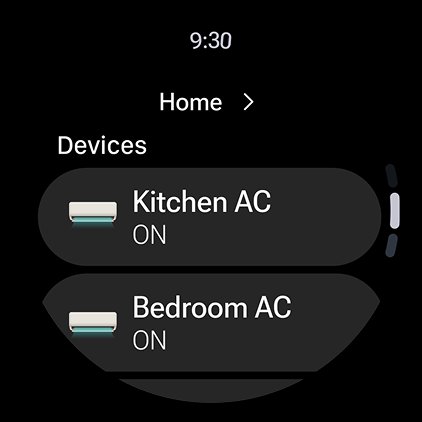
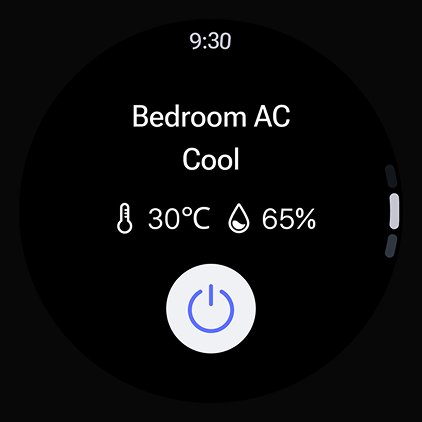
Register ThinQ ON in the ThinQ app and control your appliances with simple, natural speech.
Picha za skrini


Maelezo
Imesasishwa
Julai 7, 2026
Msanidi
LG Electronics, Inc.Ruhusa
Permissions
- android.permission.ACCESS_FINE_LOCATION
- android.permission.ACCESS_COARSE_LOCATION
- android.permission.ACCESS_BACKGROUND_LOCATION
- android.permission.FOREGROUND_SERVICE_LOCATION
- android.permission.ACCESS_NETWORK_STATE
- android.permission.READ_PHONE_STATE
- android.permission.WRITE_EXTERNAL_STORAGE
- android.permission.READ_EXTERNAL_STORAGE
- android.permission.NFC
- android.permission.BLUETOOTH
- android.permission.BLUETOOTH_ADMIN
- android.permission.BLUETOOTH_SCAN
- android.permission.BLUETOOTH_CONNECT
- android.permission.BLUETOOTH_ADVERTISE
- android.permission.ACCESS_NETWORK_STATE
- android.permission.CAMERA
- android.permission.ACCESS_WIFI_STATE
- android.permission.CHANGE_WIFI_STATE
- android.permission.WAKE_LOCK
- android.permission.INTERNET
- android.permission.DETECT_SCREEN_CAPTURE
- android.permission.CHANGE_NETWORK_STATE
- android.permission.SCHEDULE_EXACT_ALARM
- android.permission.VIBRATE
- android.permission.POST_NOTIFICATIONS
- com.google.android.gms.permission.AD_ID
- android.permission.RECORD_AUDIO
- android.permission.FOREGROUND_SERVICE_CONNECTED_DEVICE
- android.permission.UWB_RANGING
- com.google.android.c2dm.permission.RECEIVE
- com.lge.lgaccount.permission.READ
- android.permission.RECEIVE_BOOT_COMPLETED
- com.lgeha.nuts.permission.PUSH_MESSAGE_PERMISSION
- android.permission.FOREGROUND_SERVICE
- android.permission.CHANGE_WIFI_MULTICAST_STATE
- android.permission.ACCESS_BLUETOOTH_SHARE
- android.permission.READ_MEDIA_AUDIO
- com.lge.myplace.permission.API
- android.permission.FOREGROUND_SERVICE_MEDIA_PROJECTION
- android.permission.FOREGROUND_SERVICE_MEDIA_PLAYBACK
- android.permission.REQUEST_IGNORE_BATTERY_OPTIMIZATIONS
- android.permission.MEDIA_CONTENT_CONTROL
- com.lgeha.nuts.provider.ThinQProvider.READ
- android.permission.MODIFY_AUDIO_SETTINGS
- android.permission.READ_PHONE_NUMBERS
- android.permission.EXPAND_STATUS_BAR
- android.permission.FOREGROUND_SERVICE_DATA_SYNC
- com.lgeha.nuts.DYNAMIC_RECEIVER_NOT_EXPORTED_PERMISSION
- com.google.android.finsky.permission.BIND_GET_INSTALL_REFERRER_SERVICE
- android.permission.ACCESS_ADSERVICES_ATTRIBUTION
- android.permission.ACCESS_ADSERVICES_AD_ID
- com.samsung.android.mapsagent.permission.READ_APP_INFO
- com.huawei.appmarket.service.commondata.permission.GET_COMMON_DATA
- Manifest.permission.FOREGROUND_SERVICE_CONNECTED_DEVICE
Ripoti
Matoleo ya Kale
LG ThinQ 5.1.32310
Pakua XAPK
MB 304.4
LG ThinQ 5.1.30400
Pakua XAPK
MB 277.5
LG ThinQ 5.1.30310
Pakua XAPK
MB 277.5
LG ThinQ 5.1.28210
Pakua XAPK
MB 271.9
LG ThinQ 5.1.26410
Pakua XAPK
MB 271.5
LG ThinQ 5.1.24320
Pakua XAPK
MB 296.0
LG ThinQ 5.1.22220
Pakua XAPK
MB 294.0
LG ThinQ 5.1.20330
Pakua XAPK
MB 271.9
LG ThinQ 5.1.18230
Pakua XAPK
MB 195.1
LG ThinQ 5.1.16330
Pakua XAPK
MB 198.6
LG ThinQ 5.1.14240
Pakua XAPK
MB 281.4
LG ThinQ 5.1.12230
Pakua XAPK
MB 190.1
LG ThinQ 5.1.10410
Pakua XAPK
MB 202.8
LG ThinQ 5.1.10210
Pakua XAPK
MB 202.7
LG ThinQ 5.0.42620
Pakua XAPK
MB 228.7
LG ThinQ 5.0.40920
Pakua XAPK
MB 271.9
LG ThinQ 5.0.40830
Pakua XAPK
MB 224.8
LG ThinQ 5.0.40420
Pakua XAPK
MB 143.1
LG ThinQ 5.0.38740
Pakua XAPK
MB 221.1
LG ThinQ 5.0.36600
Pakua XAPK
MB 220.0
LG ThinQ 5.0.36540
Pakua XAPK
MB 267.0
LG ThinQ 5.0.36320
Pakua XAPK
MB 193.1
LG ThinQ 5.0.36130
Pakua XAPK
MB 287.6
LG ThinQ 5.0.30250
Pakua XAPK
MB 208.3
LG ThinQ 5.0.28271
Pakua XAPK
MB 304.6
LG ThinQ 5.0.28270
Pakua XAPK
MB 324.9
LG ThinQ 5.0.24123
Pakua XAPK
MB 227.4
LG ThinQ 5.0.24121
Pakua XAPK
MB 158.8
LG ThinQ 5.0.24120
Pakua APK
MB 225.7
LG ThinQ 5.0.22221
Pakua XAPK
MB 132.3
LG ThinQ 5.0.18120
Pakua XAPK
MB 161.4
LG ThinQ 5.0.14130
Pakua APK
MB 181.7
LG ThinQ 4.1.42111
Pakua APK
MB 169.4
Hakuna matoleo yanayolingana